New: Fixed: the composer's model no longer switches back after each messageChangelog →

Coworkers you can hand real work to

They sign in to the tools you already use, work across apps, inboxes and websites, finish the job end to end — and only come back to you when something needs a decision.

Runs on your infrastructure Any agent framework Full audit trail In 29 languages

Meet a few of the Bots you can put to work

  • General AssistantEveryday work on the web and in files
  • Research DeskBriefs with sources, and what it couldn't find
  • Expense ReviewChecks each claim against your policy
  • Ticket TriageSorts and routes support tickets
  • Meeting Follow-upsTurns meeting notes into follow-ups
  • Account BriefA one-page briefing before your call

Bring any AG-UI agent

LangGraphMastraCrewAIPydantic AIGoogle ADKLlamaIndexAgnoAG2StrandsMicrosoft Agent Framework

Runs on the model key you bring

What makes it different

Not a chatbot. A colleague with a computer.

⧉

Works where APIs don't

Sales tools, finance portals, recruiting systems: if a person can use it in a browser, a coworker can too — no integration project first.

✓

Finishes, then reports back

It carries a job through every step and asks you only for the decisions that are really yours.

↻

Remembers and improves

It keeps what you told it, learns how you like things done, and picks up threads you forgot.

Chat

Talk to a Bot the way you talk to a colleague

Write in plain words. It asks when something is unclear, does the work, and tells you when it's done.

  • Many Bots at onceGive different jobs to different Bots and let them work in parallel.
  • Several Bots in one threadBring Bots and people into one conversation. Bots hand work to each other, and you see every hand-off.
  • Wherever you writeThe workspace, Slack, Microsoft Teams, LINE, WhatsApp, email or your phone.
Supplier Desk · Demo conversation with sample data
  1. Compare the three supplier quotes in my notes and tell me which is best.
  2. On it. I'm reading your Supplier shortlist note and the three quotes.
  3. notes.read · Supplier shortlistallowed
  4. Blue Harbor Supply is cheapest at ¥398,500. Kite & Co. is fastest, at 6 days. Shall I draft a reply to Blue Harbor?
  5. Yes, draft it, but don't send it yet.
  6. Draft saved · waiting for your approval before sendingasks first
See it working

Real screens from the product

Short captures from a test workspace with made-up names and sample data.

Screen capture

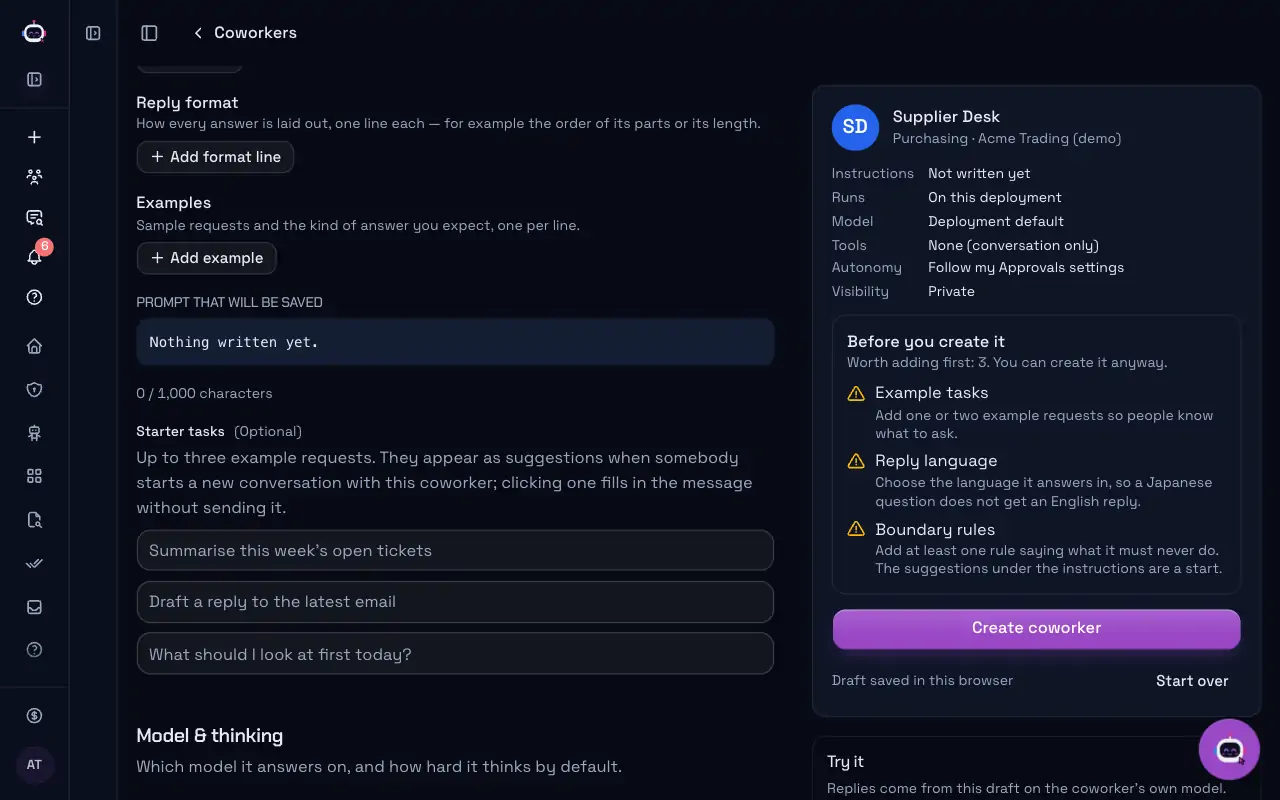
Create a Bot

Describe the job in one sentence. The builder fills in a name, instructions and tools that you can change before you save.

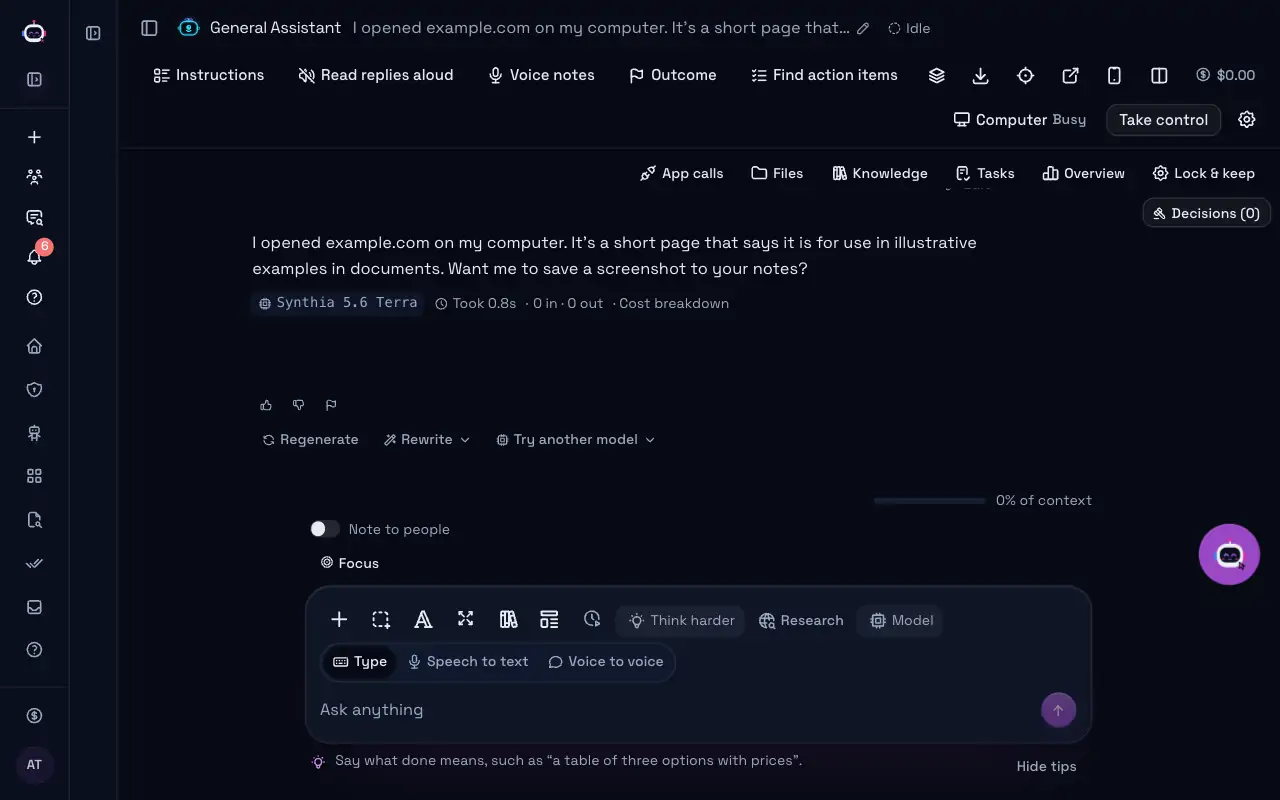
Screen capture

A Bot working in its browser

Each Bot has its own computer. Watch its screen live while it reads a page, and take over at any moment.

Screen capture

Bot Marketplace

Add a ready-made Bot in one click and fill in your company's details. Marketplace Bots use 2× credits.

Screen capture

Bot Company

Pick a kind of business and get a whole team of Bots for it: a CEO, department heads and specialists who hand work to each other.

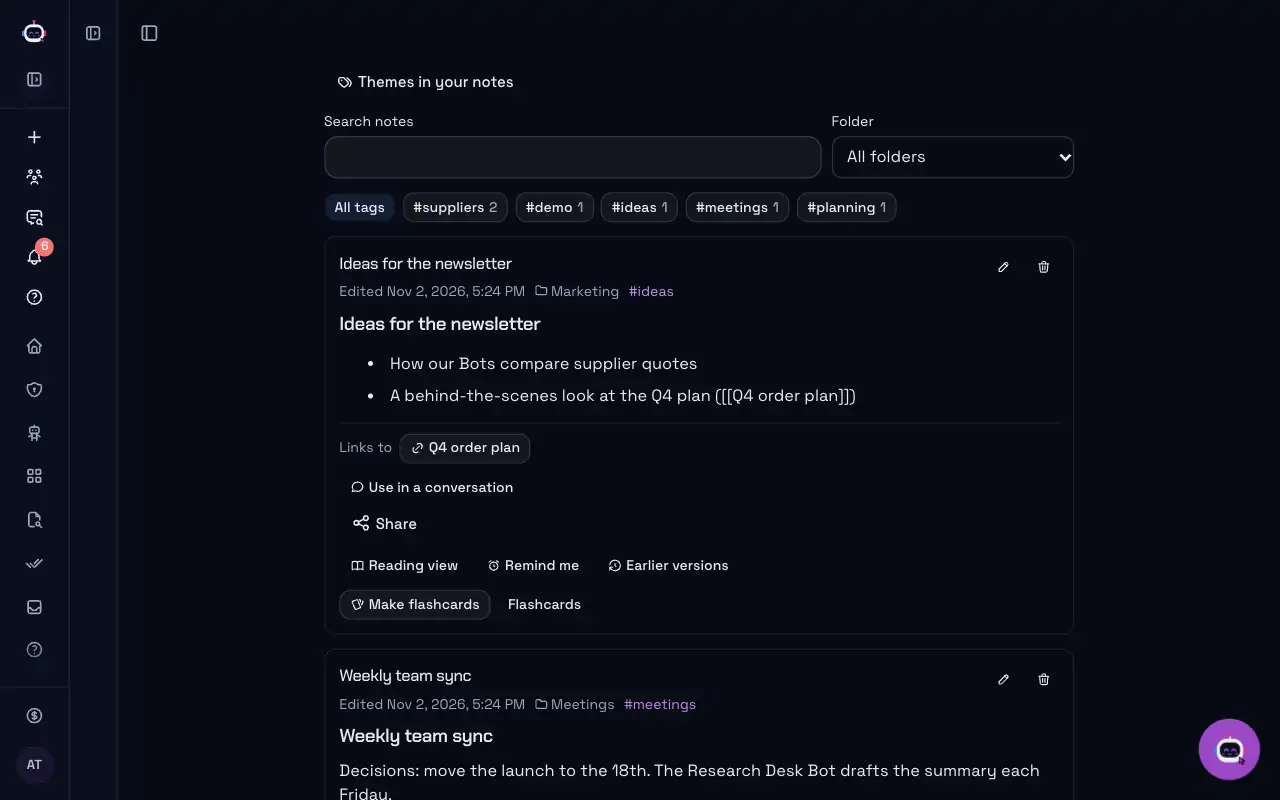
Personal notes in folders, with tags and links between notesScreenshot

Your notes vault

Folders, tags and [[links]] between notes, with backlinks. Bots you allow can read your notes and add to them.

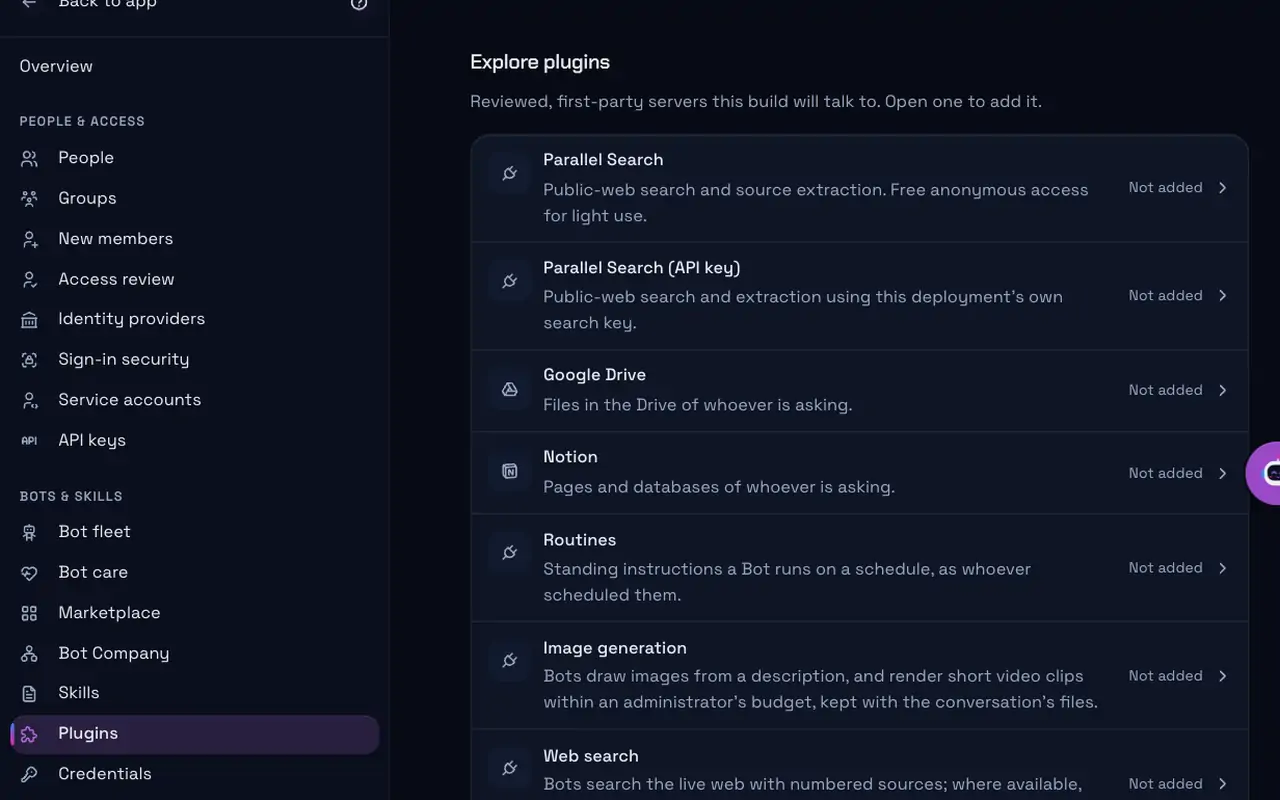
The list of apps and tools an administrator can add for BotsScreenshot

Integrations

Choose the apps and tools your Bots may use, such as Google Drive, Notion and web search. Each person connects their own account.

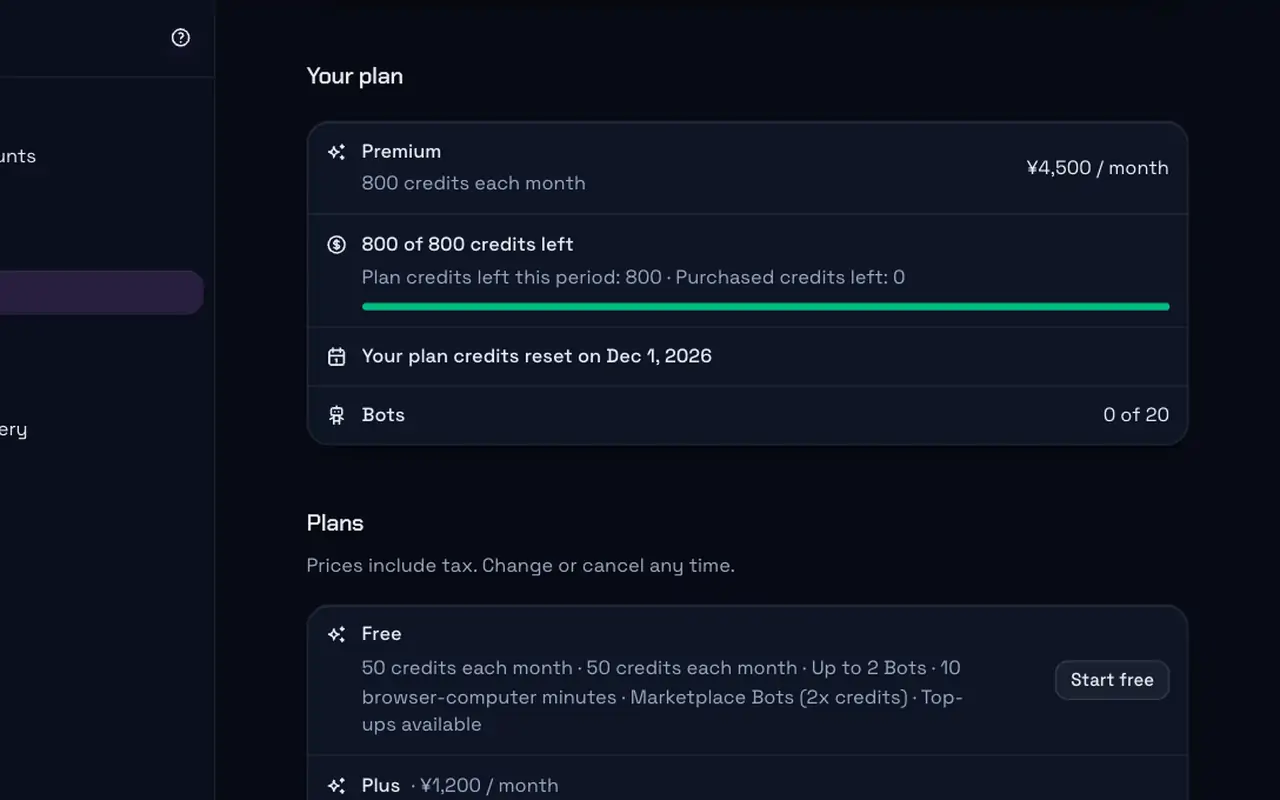
A plan page showing the credits left this month and when they resetScreenshot

Plan and credits

See your plan, the credits left and the day they reset, so the bill never surprises you.

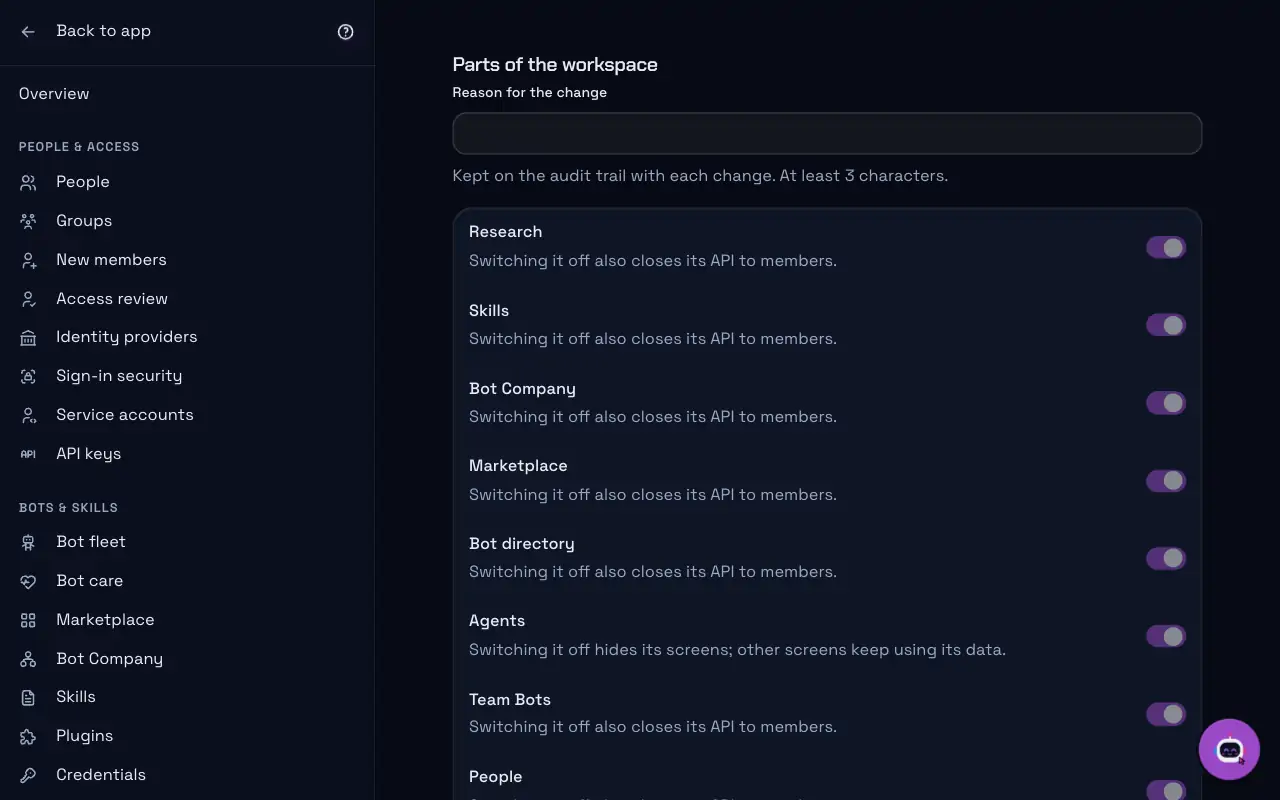
The admin page where whole parts of the workspace are switched on or offScreenshot

Admin controls

Switch parts of the workspace on or off for everyone. Each change keeps its reason on the audit trail.

Building Bots

From one sentence to a working Bot

  1. Describe the jobSay what the Bot should do, or start from a template, a document or your website.
  2. Shape itCheck its name, instructions, tone, examples and the tools it may use.
  3. Try it, then create itTest it with a real request before anyone else sees it.
The builder's settings for tone, reply language, rules and example repliesScreenshot
Synthia Image

Pictures from a description

Ask a Bot for an image, or type /imagine in a conversation. Improve the prompt first, share pictures in a team gallery and keep a brand style kit. Your administrator turns it on and sets the budget.

Illustration. It shows the steps, not a real generated picture.

Learn more →
Voice

Talk, and listen back

Dictate a message, have replies read aloud, or speak with a Bot voice to voice. On your phone, send a voice note.

A conversation with buttons to read replies aloud, dictate, or talk voice to voiceScreenshot
Learn more →
How to start

Your first Bot at work in six steps

  1. Sign upSign in with your work account.
  2. Pick a planStart free and change plans at any time.
  3. Pick a Bot or a Bot CompanyAdd one from the marketplace, build your own, or start a whole Bot Company.
  4. Connect your appsLet it use the tools your work lives in.
  5. Give it a taskAsk in plain words, and watch it work on its screen.
  6. Approve, then check creditsSay yes to anything that matters, and see what each task used.

Read the quickstart→

5000+capabilities catalogued
4000+live today, each with proof
260+ready-made Bots in the directory
29languages across the whole workspace
By default

What it won't do

Each of these is a control in the code, not a promise in a prompt.

Type your passwords

A field or setting named as a password, passcode, two-factor or verification code is handed to you. You sign in through a private form the coworker never sees, and password fields are hidden from everything it reads back.

Pay for something

A pay, checkout, purchase or place-order button, or a card number, CVV or IBAN field, is handed to you. No rule you or your team saves can let the coworker do it.

Reach cloud metadata addresses

Whatever the network policy says, even allow all, the computer refuses link-local and cloud metadata addresses, where a machine's credentials are handed out.

A service from ai-sns.io

AI makes the calls. You take the meetings.

Our AI call agent SALESLENS CALL phones prospects on your behalf, confirms their challenge, timing and decision-maker, and delivers only the ones ready for a sales meeting, with a call summary and recording.

✓

Business-to-business (B2B) calling

✓

Says up front that it is an AI and that the call is recorded

✓

Never calls back anyone who said no

Pricing

Pricing

Start free, upgrade when you need more.

Proposed pricing — subject to change.

Free

Try Bots on your own work

¥0/ month

12 credits every week

≈ 50 credits every month

Start free

About this many tokens a week

  • Synthia 4.74K
  • Synthia 4.37.7K
  • Synthia Build 0.19.6K
  • Synthia 5.51.1K
  • Synthia X 5.53K
  • Synthia X Pro 5.51.5K
  • Up to 2 Bots
  • 10 browser-computer minutes
  • Marketplace Bots (2x credits)
  • Top-ups available

Plus

For light everyday use

¥1,200/ month

$8.00

46 credits every week

≈ 200 credits every month

Get Plus

About this many tokens a week

  • Synthia 4.715K
  • Synthia 4.329K
  • Synthia Build 0.137K
  • Synthia 5.54.1K
  • Synthia X 5.512K
  • Synthia X Pro 5.55.8K
  • Up to 5 Bots
  • 30 browser-computer minutes
  • All models
  • Marketplace Bots (2x credits)
Most popular

Premium

For one person working with Bots every day

¥4,500/ month

$30.00

185 credits every week

≈ 800 credits every month

Get Premium

About this many tokens a week

  • Synthia 4.762K
  • Synthia 4.3118K
  • Synthia Build 0.1148K
  • Synthia 5.516K
  • Synthia X 5.546K
  • Synthia X Pro 5.523K
  • Up to 20 Bots
  • 120 browser-computer minutes
  • Add team seats
  • All models
  • Marketplace Bots (2x credits)

Super

For heavy use and small teams

¥15,000/ month

$100.00

646 credits every week

≈ 2,800 credits every month

Get Super

About this many tokens a week

  • Synthia 4.7215K
  • Synthia 4.3413K
  • Synthia Build 0.1517K
  • Synthia 5.557K
  • Synthia X 5.5162K
  • Synthia X Pro 5.581K
  • Up to 100 Bots
  • 600 browser-computer minutes
  • Add team seats
  • All models
  • Marketplace Bots (2x credits)

Ultra

For the heaviest use

¥30,000/ month

$200.00

1,338 credits every week

≈ 5,800 credits every month

Get Ultra

About this many tokens a week

  • Synthia 4.7446K
  • Synthia 4.3856K
  • Synthia Build 0.11.1M
  • Synthia 5.5119K
  • Synthia X 5.5335K
  • Synthia X Pro 5.5167K
  • Unlimited Bots (fair use)
  • 1,500 browser-computer minutes
  • Add team seats
  • All models
  • Marketplace Bots (2x credits)

Enterprise

For a whole company

Custom

Credits sized to your company

Contact sales
  • Committed credit volume
  • SSO and audit log
  • Custom seats and limits
  • Invoice billing

Token figures are approximate. They assume this ratio of input tokens (what a Bot reads) to output tokens (what it writes): 3 : 1. Actual use varies with the work: long prompts, images, video and marketplace Bots use more credits. Credits per model

Need more? Buy credit top-ups any time; they never expire.

See every plan

Questions

Good to know

How is a Bot different from a chat assistant?

A Bot has its own computer and tools, carries a job through every step, and asks you before anything that matters.

Where do I talk to my Bots?

In the workspace on the web or on your phone, and in Slack, Microsoft Teams, LINE, WhatsApp or email once your administrator connects them.

Does each Bot have its own computer?

Yes. Each Bot works in its own private browser and files, and you can watch its screen or take over.

What does it cost?

Each plan comes with monthly credits, and Bots from the marketplace use 2× credits. The Pricing page lists the current plans.

Who decides what a Bot may do?

Your administrators. Bots only use the apps you connect, risky actions wait for a person's approval, and every action is on the audit trail.

All questions →

Put your first coworker to work

Sign in, open a channel, and ask it to do something real on the web.

Open the workspace→